We’re always working to make PIM faster, smarter, and easier for inspections across all industries. This update brings practical improvements and new features designed to make your workflow smoother - thanks to your feedback!
Greentree Import
* Greentree is now built directly into PIM as its own integration, making it easier than ever to bring your inspections across. To find out how to get connected, contact us via the PIM Help Desk.
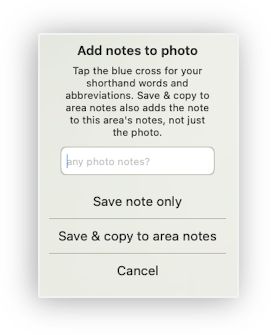
Copy Photo Notes
* When adding notes to a photo, simply tap Save & copy to area notes and your note will appear on both the photo and in the inspection area notes — no more typing the same thing twice.
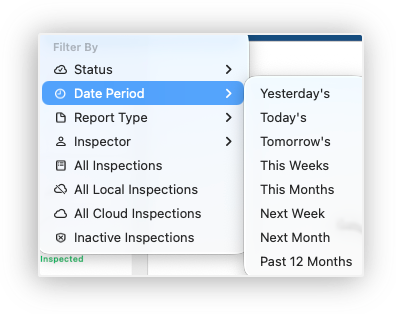
Next Week & Next Month Filters
* Quickly find upcoming inspections with two new date filters — "Next Week" and "Next Month" — in the Date Period filter menu. Plan ahead without scrolling through everything.
Maintenance Requests
* Raise maintenance requests directly from any inspection using the menu, available at property level or within the inspection itself. For Cirrus8 and Re-Leased users, work or maintenance requests are sent straight through to your property management system. No integration? No problem. A fully formatted maintenance request — including photos, priority, and target date — can be sent via email to any contact on your phone. You can also pull in additional images from other areas of the inspection before hitting send.
AI Assisted Inspections
* Meet your new AI writing assistant — generate inspection notes from photos or polish your own words with a single tap. To get early access, reach out to us via Settings > Advanced to register your interest. More info here.
Smoother
* This update brings a range of behind-the-scenes improvements to make your everyday experience smoother and more reliable. You can now sort your Inspection Area Property Profiles, and we have also enhanced diagnostics and improved Property Tree property profile support to include callout sections.
Faster inspections, smarter features, and smoother workflows - thanks for helping us make PIM better every day! We’re planning some exciting new features and would love your input. Tell us which improvements matter most to you - your feedback directly shapes the PIM roadmap. You can get in touch anytime.
Download the Update Now!

Was this article helpful?
That’s Great!
Thank you for your feedback
Sorry! We couldn't be helpful
Thank you for your feedback
Feedback sent
We appreciate your effort and will try to fix the article